Your basket
Click Buy licences at the top of the team admin dashboard.
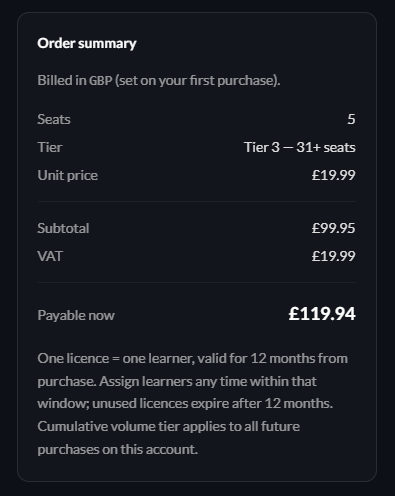
Select how many seats you need and you’ll see the price update as you go - tier discounts apply automatically for larger volumes.
VAT is added based on your billing address.
UK companies will see VAT added separately at the line-item level.
EU-based businesses must enter their VAT number - which will zero the VAT shown in the basket.
Australian, Canadian and US based businesses will not see tax added.
Note that Safe AI Habits is billed by 620 Media Ltd - based in the UK.
Coupon codes
If you are lucky enough to have a coupon code, add it before adding your payment details - the discount will be reflected straight away.
Checkout
Continue to checkout to enter your card details.
We accept Visa, Mastercard, Amex and Discover payment cards directly
Google Pay, Apple Pay, Revolut Pay and Amazon Pay are also accepted.
Our payment processor is Stripe.
After payment
You will land back on a success screen with a quick confetti celebration.
Your dashboard refreshes with the new seat count, and you will be shown a download link for your receipt/invoice.
This will also be sent to you by email.
Refunds
Once licenses are bought - refunds aren't possible.
How long do licenses last?
Click here for details on licenses.